How to Stream on Twitch: The Complete Beginner's Guide
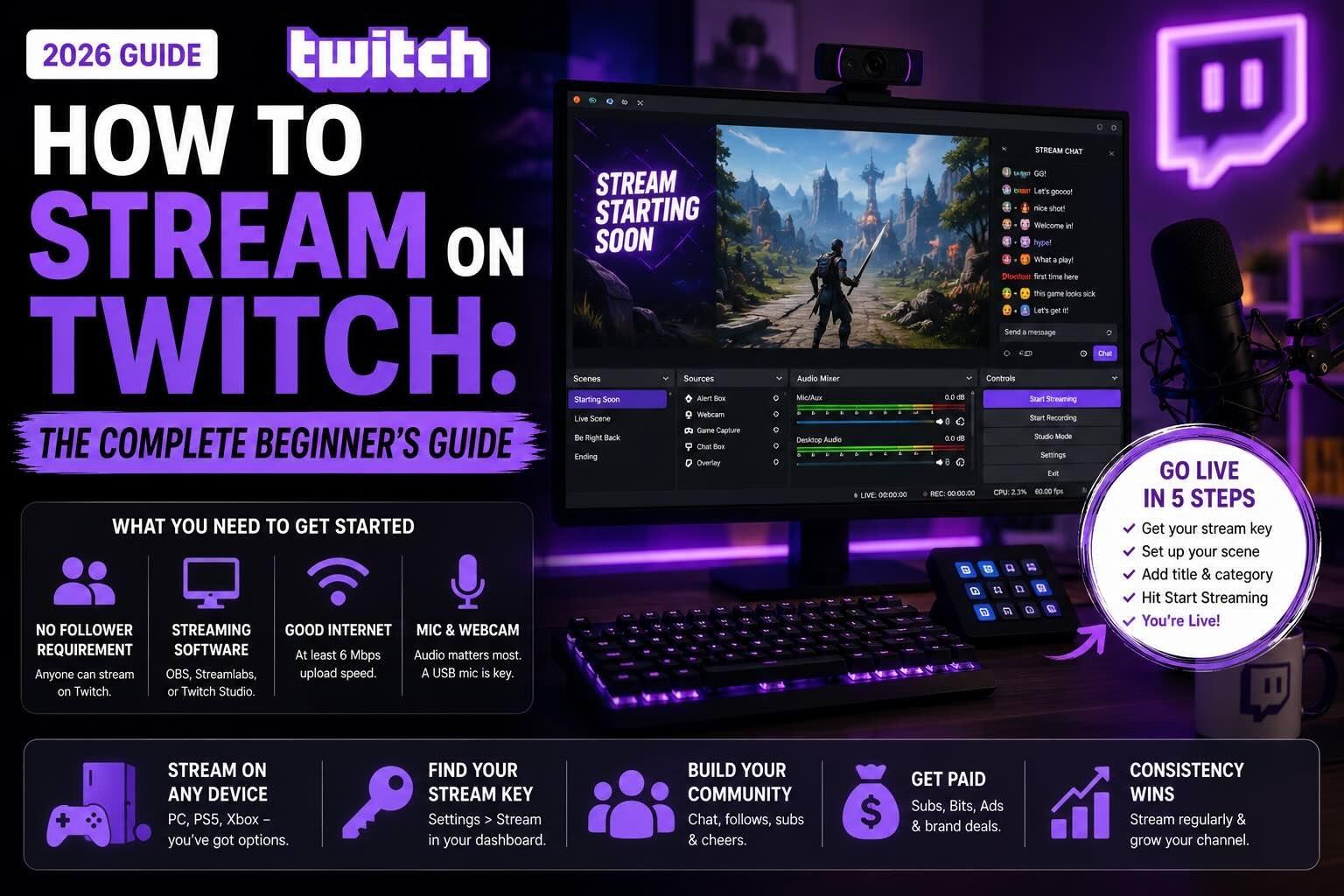
Twitch is where livestreaming culture basically started, and it is still the home base for gamers, IRL streamers, and anyone who wants to build a real community in real time. But getting started can feel intimidating, between stream keys, OBS, and a wall of settings that TikTok and Instagram never make you think about. So whether you are figuring out how to stream on Twitch for the first time, trying to go live from a console, or just hunting for your stream key, this guide walks through all of it as of 2026.
Let's get into it.
How to stream on Twitch (step by step)
Streaming on Twitch takes a little more setup than other platforms, but once it is wired up, going live is one click. If you are figuring out how to start streaming on Twitch, here is the full process from a computer:
- Create your Twitch account and turn on two-factor authentication (you will need it before you can stream).
- Download streaming software. OBS Studio (free) is the standard, though Streamlabs and Twitch Studio are popular beginner-friendly options.
- Connect your stream key. In your Twitch Creator Dashboard, go to Settings > Stream to find your stream key, then paste it into your software (more on this below).
- Set up your scene. Add your game or screen capture, your webcam, and any overlays or alerts.
- Add a title and category, then hit Start Streaming in your software. You are now live on Twitch.
That's it. Once you are live, viewers can follow, chat, cheer with Bits, and subscribe. When you are done, stop the stream in your software and Twitch saves a VOD you can clip and repurpose.
A few quick tips so your first stream does not feel like shouting into the void:
- Talk to the few viewers you have, immediately. Empty-room silence tanks your average viewer count, which is the metric that actually matters for growth.
- Stream on a consistent schedule. Twitch rewards reliability, and your community learns when to show up.
- Pick a less-saturated category. You will get buried in Just Chatting or League; a smaller game gets you discovered.
What do you need to stream on Twitch?
People expect a follower requirement here like TikTok or Instagram have, but Twitch is different: anyone can stream on Twitch from day one, with no follower minimum. The follower thresholds only matter when you want to start earning (the Affiliate program, covered below). If you are streaming across multiple platforms, the comparison matters: TikTok and Instagram both require 1,000 followers to go live, while YouTube requires 50 subs for mobile or zero subs from a desktop.
What you actually need to stream on Twitch:
- A Twitch account with a verified email and two-factor authentication enabled.
- Streaming software like OBS, Streamlabs, or Twitch Studio (all free).
- A decent computer and internet. Aim for at least 6 Mbps upload for a smooth 1080p stream.
- A mic, and ideally a webcam. Audio quality matters more than video, so a USB mic is the highest-value first upgrade.
As for age, you have to be at least 13 to use Twitch, and 13 to 18 year olds must stream under the supervision of a parent or guardian per Twitch's terms.
How to find your Twitch stream key
Your stream key is the unique code that connects your streaming software to your Twitch channel, and finding it trips up almost every new streamer. Here is how to find your Twitch stream key:
- Log in to Twitch and open your Creator Dashboard.
- Go to Settings > Stream.
- Under Stream Key & Preferences, click Copy next to your primary stream key.
- Paste it into the stream settings of OBS, Streamlabs, or whatever software you use.
One important safety note: never share your stream key or show it on screen. Anyone who has it can broadcast to your channel. If it ever leaks, hit Reset on that same page to generate a new one.
How to stream on Twitch from PC, PS5, and Xbox
You do not need a high-end PC to stream on Twitch. Here is the short version for each setup.
PC: Use OBS or Streamlabs with your stream key, as described above. This gives you the most control over overlays, scenes, and quality.
PS5: Twitch broadcasting is built right in. Start your game, press the Create button, choose Broadcast, select Twitch, and link your account. No extra software needed.
Xbox (Series X/S and One): Download the Twitch app from the store, sign in, and select Broadcast. Like PS5, console streaming is built in and beginner-friendly, though it offers fewer customization options than a PC setup.
For console streamers who want PC-level overlays and alerts, the upgrade path is a capture card that pipes your console into OBS on a computer.
Streaming software and the best time to stream
The two questions new streamers ask most: what software, and when?
Software: OBS Studio is the free industry standard and what most serious streamers use. Streamlabs is OBS with a friendlier interface and built-in alerts. Twitch Studio is Twitch's own beginner app. Any of the three works; start simple and upgrade when you feel limited.
Timing: The best time to stream on Twitch is when your specific audience is online, but as a general rule, weekday evenings and weekend afternoons in your timezone tend to perform well. More important than the exact hour is consistency: streaming the same days and times every week beats chasing a perfect slot.
What should you stream on Twitch?
If you are wondering what to stream on Twitch, the honest answer is: whatever you can do consistently and talk through out loud. Gaming is the obvious category, but Just Chatting, creative streams (art, music, coding), body-doubling and study-with-me sessions, and IRL streams all thrive on Twitch. The winning move for a new streamer is to pick a smaller, less-saturated category so you are not buried under thousands of others. When you go live on Twitch in a niche you genuinely enjoy, it shows, and that energy is what turns first-time viewers into followers.
How creators get paid on Twitch
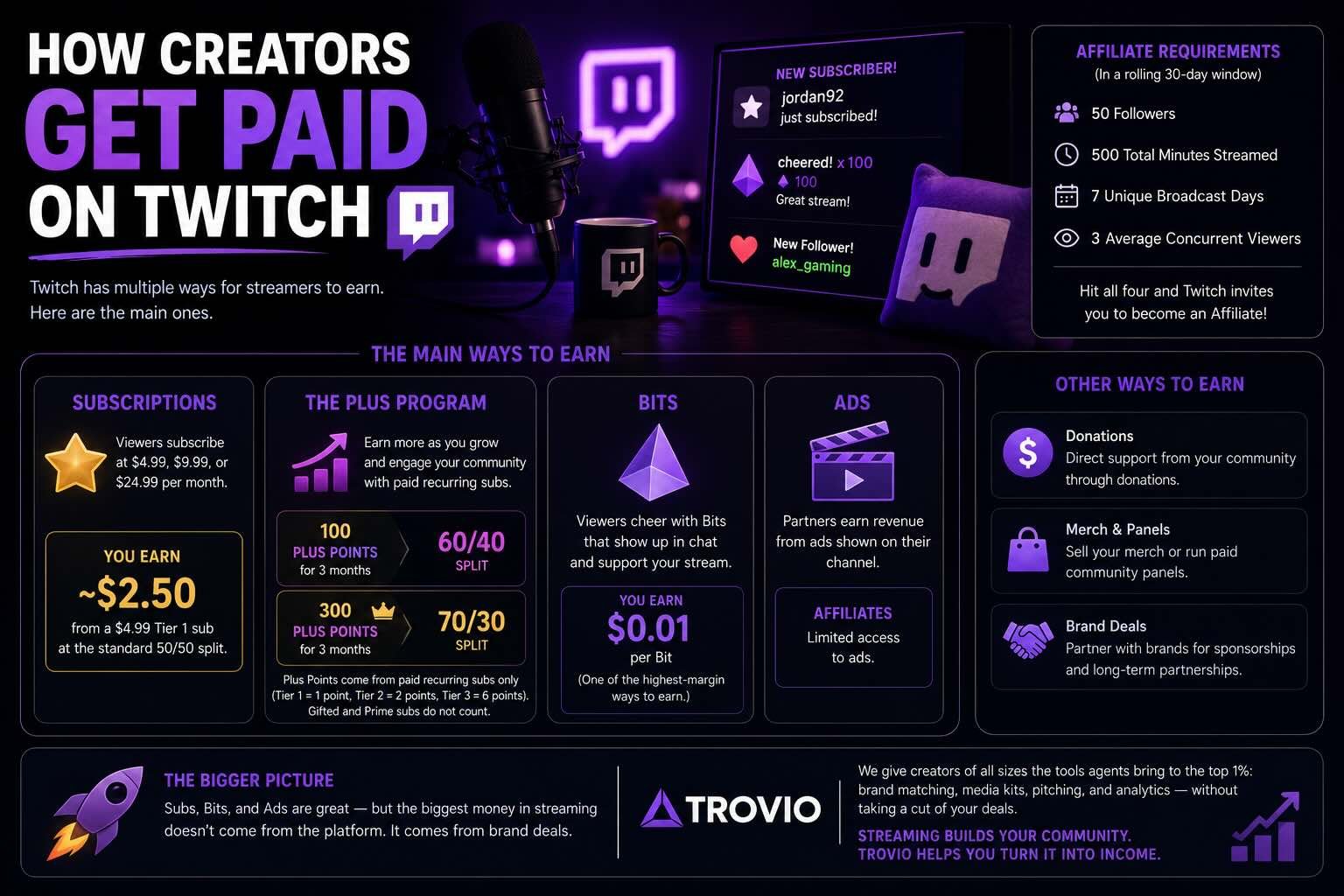
Twitch has one of the most developed creator economies anywhere, but you have to unlock it first by becoming a Twitch Affiliate.
Affiliate requirements (all within a rolling 30-day window): 50 followers, 500 total minutes streamed, 7 unique broadcast days, and an average of 3 concurrent viewers. Hit all four and Twitch automatically invites you to monetize.
Once you are earning, here is how the money works:
- Subscriptions: Viewers subscribe at $4.99, $9.99, or $24.99 per month. The standard split is 50/50, so you keep about $2.50 of a Tier 1 sub.
- The Plus Program: Both Affiliates and Partners can unlock better splits. Sustaining 100 Plus Points for 3 months gets you a 60/40 split; 300 Plus Points gets you the full 70/30. Plus Points come from paid recurring subs only (Tier 1 counts as 1, Tier 2 as 2, Tier 3 as 6); gifted and Prime subs do not count.
- Bits: Viewers cheer with Bits, worth about $0.01 each to you. Because the platform fee is paid by the viewer, Bits are one of the higher-margin ways to earn.
- Ads: Partners earn ad revenue; Affiliates have more limited access.
Here is the honest part. Subs and Bits are great, and Twitch's community is unmatched for turning viewers into regulars. But the biggest money in streaming does not come from the platform, it comes from brand deals, and that is true whether you are a gamer, an artist, or an IRL streamer. The problem is that landing brand deals usually means having representation, and most creators do not have an agent. That is the gap Trovio closes. We give creators of all sizes the tools agents bring to the top 1%: brand matching, media kits, pitching, and analytics, without taking a cut of your deals. Streaming builds your community. Trovio helps you turn it into income.
Quick FAQ
Do you need followers to stream on Twitch? No. Anyone can stream on Twitch from day one. You only need 50 followers (plus other requirements) to start earning through the Affiliate program.
How do I start streaming on Twitch? Create an account, download OBS or Streamlabs, paste in your stream key, set up your scene, then hit Start Streaming. No followers required to begin.
How do I find my Twitch stream key? In your Creator Dashboard, go to Settings > Stream, and copy your key under Stream Key & Preferences. Never share it publicly.
Can you stream on Twitch from a console? Yes. Both PS5 (via the Create button) and Xbox (via the Twitch app) have broadcasting built in, no PC or capture card required.
How old do you have to be to stream on Twitch? You must be at least 13, and 13 to 18 year olds must stream under parental supervision.
How much do Twitch streamers make per sub? About $2.50 on a $4.99 Tier 1 sub at the standard 50/50 split, rising to roughly $3.50 if you reach the 70/30 Plus Program tier.
Ready to grow the community that makes streaming worth it? See how Trovio helps creators land brand deals →